Desktop Console
The desktop console is organised to answer one question quickly: what is the lab doing right now, and should you trust it?
Guided setup
Section titled “Guided setup”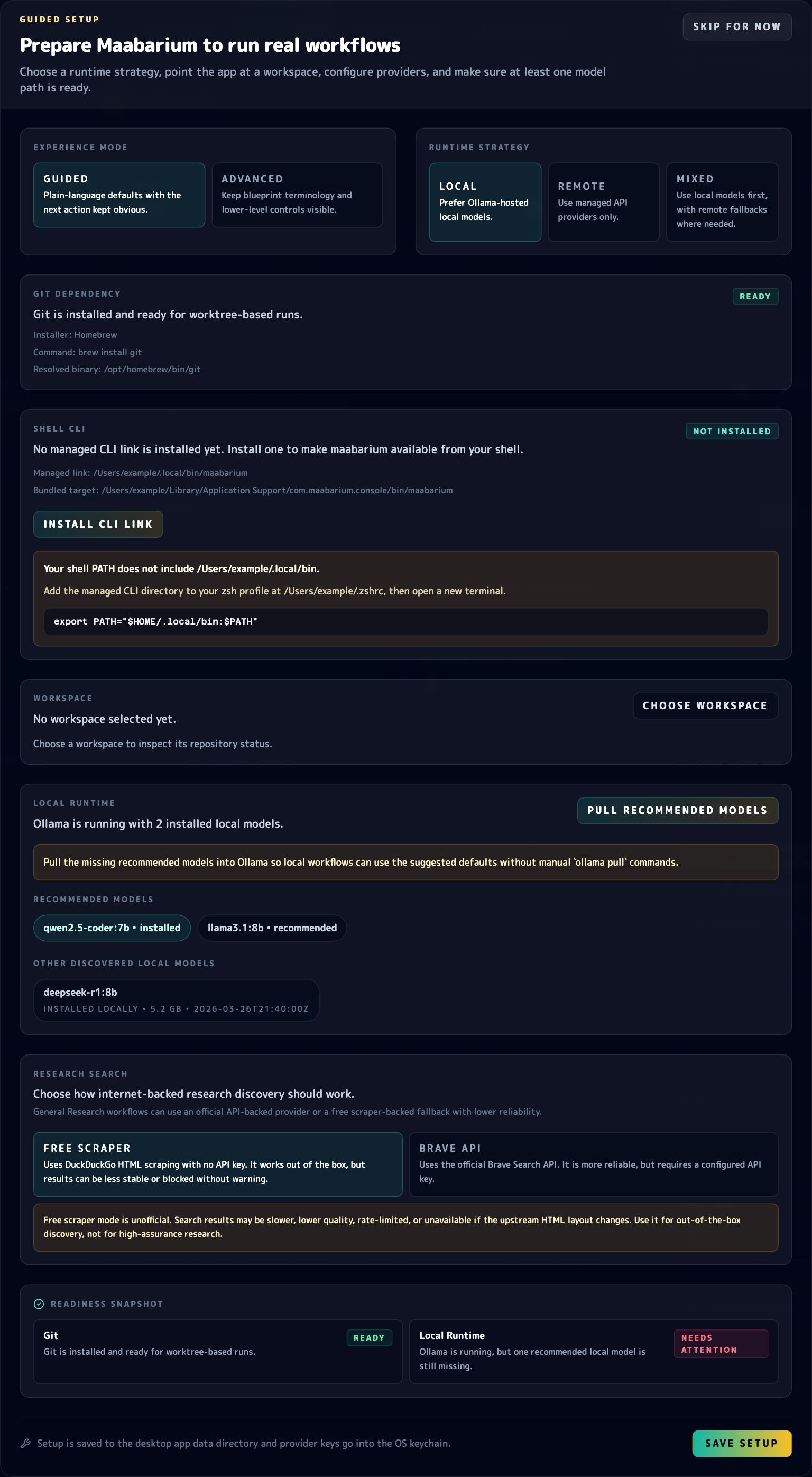
Guided setup is part of the desktop console experience, not a separate installer screen. It prepares the machine and runtime state that the rest of the console depends on.
Before you spend time in the main console, the setup modal handles the machine and runtime checks that make the rest of the UI meaningful. That includes Git readiness, optional shell CLI integration, workspace selection, local Ollama readiness, and the in-app Pull Recommended Models action.
The modal now also keeps the choice between Guided and Advanced visible. Guided mode favors environment profiles and safer defaults, while Advanced mode exposes lower-level runtime strategy, provider, and research-search controls directly.
Top navigation
Section titled “Top navigation”The sticky top bar gives you fast movement across:
- overview metrics
- console activity
- workflow library
- maintenance tools through a direct Maintenance jump target
It also keeps the active workflow, run controls, and workflow actions visible.
Overview
Section titled “Overview”The overview section surfaces high-signal metrics first:
- latest score
- winner score, including retained-winner context when available
- average iteration behaviour
- token usage
- CPU load and telemetry health
This is the fastest way to see whether the system is healthy before reading raw logs.
Console activity
Section titled “Console activity”The console area is where you spend most of your time during an active run. Expect to use it for:
- log review
- proposal review
- experiment history
- research evidence
- runtime signals, Git readiness state, and LoRA runtime metadata when relevant
During setup and early troubleshooting, the desktop flow also surfaces runtime actions directly in context, including Git installation help, Ollama install and start actions, recommended-model pulls, and optional shell CLI integration.
Run Analytics, Evidence, Workflow Library, and Maintenance can now be collapsed independently, and the desktop app restores that panel layout on restart so the console reopens in the shape you last used.
Workflow library
Section titled “Workflow library”The workflow library is the control point for choosing, filtering, editing, and creating blueprints.
Use it when you need to:
- switch to a different workflow quickly
- search by language or workflow type
- open the blueprint wizard
- edit an existing workflow definition
When you open the Blueprint Wizard, the guided path now keeps the workflow identity block before goal selection, then walks through output, workspace, runtime, and final review. Choosing a goal updates the derived workflow defaults, but you stay on the same step until you press Next Step. Advanced controls remain available when you need direct access to the underlying blueprint fields.
The guided wizard also keeps the live summary rail and step actions pinned inside their own sticky scroll area, which makes long review passes easier without losing the current navigation controls.
Maintenance
Section titled “Maintenance”The maintenance section sits below the workflow library and groups operational tasks that matter after initial setup:
- readiness centre checks
- the
Run Setupre-entry path for reopening guided setup later - Git readiness and installer details when Git is missing
- local runtime actions such as installing Ollama, starting Ollama, and pulling recommended local models
- optional CLI link management for exposing
maabariumin your shell - branch cleanup previews
- persisted stack summaries
That placement is deliberate. You should not have to hunt through the main console to find maintenance tasks.