
Workflows and Blueprints
A blueprint is the contract for a workflow. It tells Maabarium what to run, how to evaluate it, and what success looks like.
Start from the outcome, not the file format
Section titled “Start from the outcome, not the file format”The easiest way to misconfigure a blueprint is to think about the TOML fields before deciding what the workflow is actually supposed to produce.
Start with the deliverable:
- Existing code or application changes: use a code-oriented workflow shape and point targets at existing source trees.
- One named document or prompt asset: use a markdown or prompt workflow shape and target the exact output file when possible.
- Research brief with citations: use a research workflow shape and markdown-style output paths.
- LoRA artefact validation: use a LoRA validation workflow shape and target manifests and artefacts, not source code.
If the output is one named markdown file, do not start from a full application workflow. That contract pushes Maabarium toward source-tree mutations and test-gated code evaluation, which is the wrong behavior for a document-first task.
Why blueprints exist
Section titled “Why blueprints exist”Without blueprints, every run becomes an ad hoc prompt chain. With blueprints, you get:
- repeatability
- clearer evaluation rules
- easier comparison between runs
- safer collaboration across teams
What a blueprint usually defines
Section titled “What a blueprint usually defines”A blueprint can include:
- the workflow name and domain
- repo or workspace expectations
- model and provider settings
- evaluator logic, including optional explicit built-in or process evaluator overrides
- proposal and iteration behaviour
- success metrics and weighting
Choosing between bundled and custom workflows
Section titled “Choosing between bundled and custom workflows”Bundled workflows are best when you want:
- a known-good starting point
- quick evaluation of the product
- examples of how the system is meant to be structured
Custom workflows are best when you already know your own operating model and want to adapt the keep-winner loop to it.
Output type and target path rules
Section titled “Output type and target path rules”The target path decision is one of the most important parts of a blueprint:
- Use an exact relative path such as
docs/project-brief.mdwhen the workflow should create or refine one specifically named output file. - Use globs such as
src/**/*.rswhen the workflow should inspect or modify a family of existing files. - Use markdown-oriented targets such as
docs/**/*.mdwhen the workflow writes documents, notes, or prompt assets across a directory.
As a rule of thumb:
- Exact path = one named output.
- Glob = many existing files.
If you choose the wrong shape here, the rest of the blueprint often looks valid while the runtime behavior is still wrong.
Editing workflows safely
Section titled “Editing workflows safely”Use the desktop wizard when you want guided editing. Edit raw blueprint files when you need full control or want to review exact source-level changes in Git.
Wizard flow
Section titled “Wizard flow”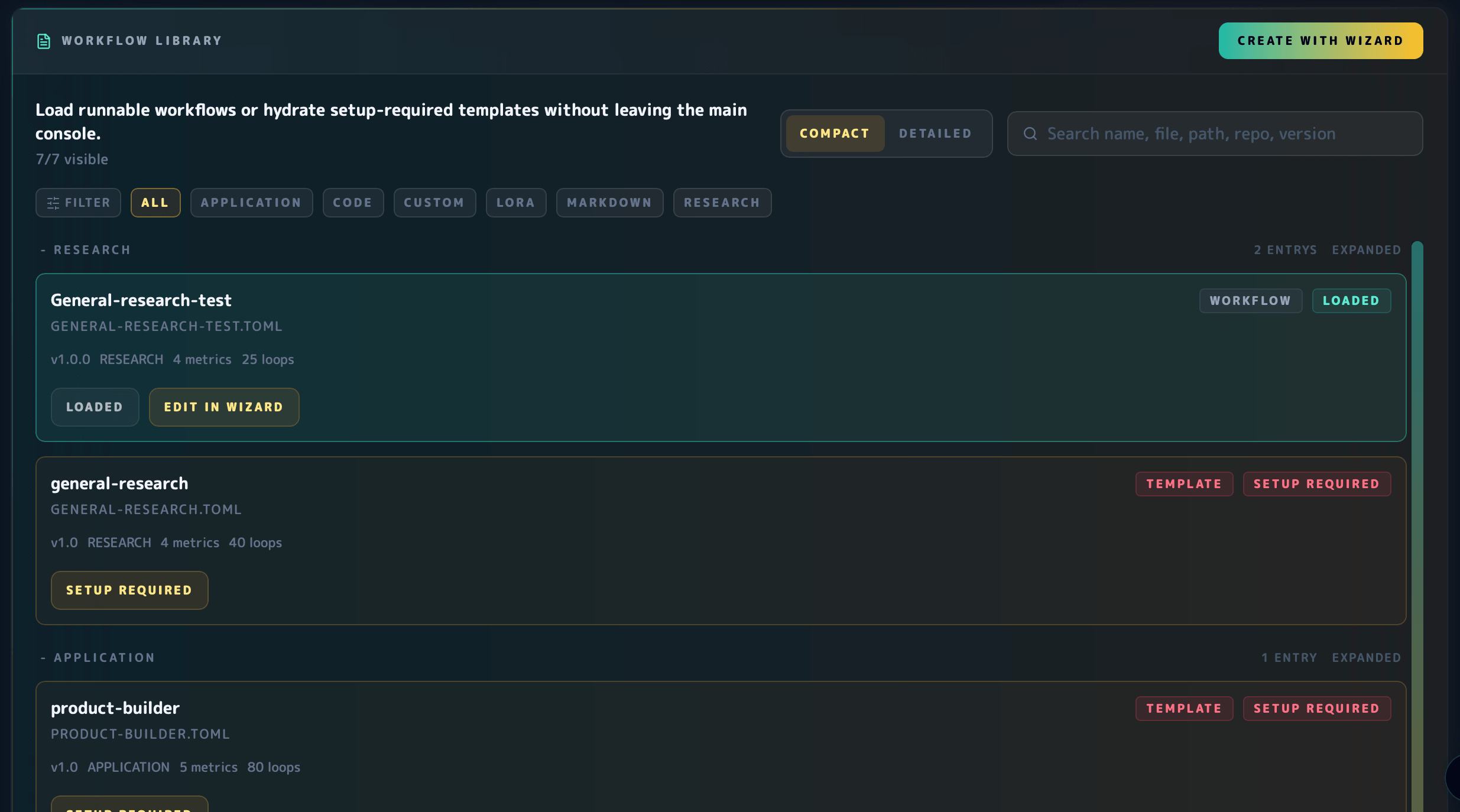
The Blueprint Wizard lives in the workflow library and now follows a more stable guided sequence before dropping into advanced fields.
In the wizard, start by setting the workflow name. Then choose the goal, refine the description after the goal-derived defaults are in place, confirm the output shape, review workspace and runtime details, and save only after the final review step.
Goal selection updates the derived workflow defaults, but it does not force you into the next step immediately. Custom description text is preserved when you switch goals, and you use the explicit Next Step action when you are ready to move forward.
The guided flow keeps advanced controls available for the raw blueprint fields:
- use the guided steps when you want the safest default path through identity, goal, output, workspace, runtime, and review
- open advanced controls when you need direct access to template selection, metrics, agents, or the shared model pool
Current goal-to-workflow mapping:
product-builderis for application-wide source changes.general-researchis for sourced briefs and citations.prompt-optimizationis for markdown or prompt assets and works best with exact.mdoutput paths when one named file is required.customis an advanced escape hatch, not the easiest default.
Evaluator routing in practice
Section titled “Evaluator routing in practice”Maabarium does not rely on language alone when it chooses an evaluator.
- Explicit overrides win first:
evaluator.kind = "process"selects a process plugin, andevaluator.kind = "builtin"withevaluator.builtin = "code" | "prompt" | "research" | "lora"selects that built-in evaluator directly. - Bundled template metadata is the next routing signal when there is no explicit override.
- Language, metric names, blueprint name, and target paths are fallback signals kept for older and custom blueprints.
That means a workflow can safely target one named markdown implementation plan without being forced onto prompt evaluation, and a prompt-optimization workflow can still opt into prompt evaluation explicitly.
For the deeper contract, continue to Blueprint Reference.